
Aadhaar Card Status – Check Aadhaar Update and Enrolment Status Online
Checking your Aadhaar Card Status helps you stay informed about the progress of a new Aadhaar application or an update request. The Unique Identification Authority of India (UIDAI) provides online facilities that allow applicants to check whether their Aadhaar number has been generated or whether their requested changes have been processed.
Whether you have recently enrolled for Aadhaar or submitted a request to update your name, address, date of birth, mobile number, or biometric details, you can use the available reference details to track your request.
You can check your Aadhaar enrolment or update status through the official myAadhaar portal. Depending on the service and reference number available, you may be asked to enter your Enrolment ID (EID), Update Request Number (URN), Service Request Number (SRN), or another applicable reference number.
What Is Aadhaar Enrolment Status?
When you apply for a new Aadhaar card at an Aadhaar Enrolment Centre, you receive an acknowledgement slip containing your Enrolment ID (EID). The EID is a reference number that helps you track the progress of your application.
By entering the required enrolment details on the UIDAI portal, you can find out whether your Aadhaar application is still being processed or whether your Aadhaar number has been generated.
Once the enrolment process is completed successfully, you can use the official myAadhaar portal to access available Aadhaar services, including downloading your e-Aadhaar.
What Is Aadhaar Update Status?
If you submit a request to change or correct your Aadhaar information, you can track its progress using the reference number provided when the request was submitted.
Common Aadhaar update requests include:
- Name correction or update
- Address update
- Date of birth correction
- Mobile number update
- Email address update
- Photograph or biometric updates
The applicable reference number may be a URN, SRN, EID, or another number provided for your particular request. Enter the correct reference details on the official UIDAI status-check page to see the latest available information.
Aadhaar enrolment and update processing times can vary depending on the type of request and verification requirements. Always check the latest status through UIDAI rather than relying on a fixed processing estimate.
Requirements to Check Aadhaar Card Status
Before checking your Aadhaar enrolment or update status online, keep the following information and facilities ready:
- Enrolment ID (EID): Keep your Aadhaar enrolment acknowledgement slip if you are tracking a new application.
- Update Reference Number: Keep the URN, SRN, EID, or other reference number associated with your update request.
- Registered Mobile Number: Keep your Aadhaar-linked mobile number available if the service requires OTP verification.
- Internet Connection: A stable internet connection is useful when accessing the UIDAI portal or mobile applications.
- Device: You can use a smartphone, laptop, desktop computer, or tablet.
- Acknowledgement Slip: Preserve your enrolment or update receipt because it contains important reference information.
Make sure you enter the correct details shown on your acknowledgement slip or update receipt to avoid unsuccessful status searches.
Methods to Check Aadhaar Enrolment and Update Status
UIDAI provides an official online facility to check Aadhaar enrolment and update requests. You can also explore supported Aadhaar services through the relevant mobile applications and contact UIDAI for assistance.
Method 1: Check Aadhaar Card Status Online Through the myAadhaar Portal
The myAadhaar portal is the official online platform for accessing Aadhaar-related services. Follow these steps to check your enrolment or update status:
- Visit the official myAadhaar portal.
- Find and select the Check Enrolment & Update Status option.
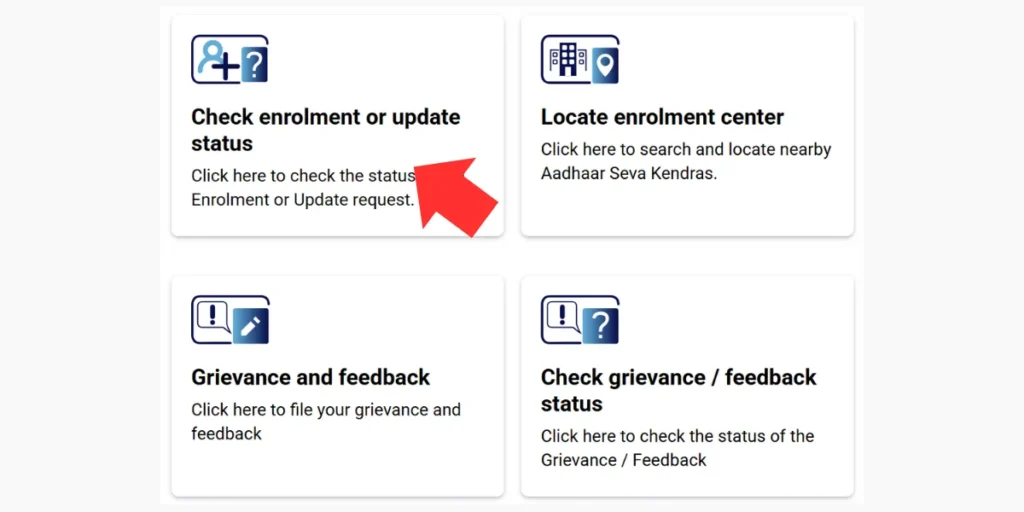
- Enter the applicable reference details requested on the page, such as your EID, URN, or SRN.
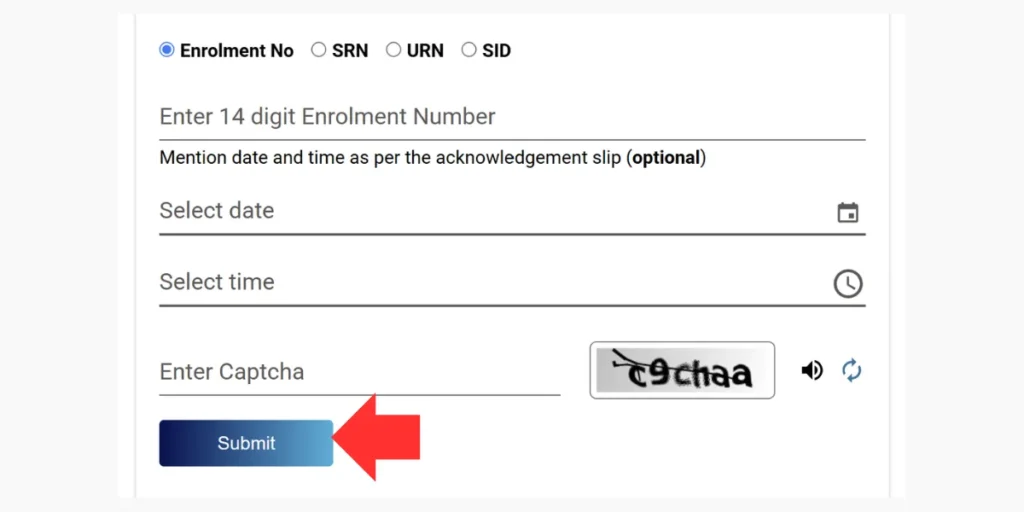
- Enter the security code or CAPTCHA if displayed.
- Complete any additional verification requested by the portal.
- Click Submit or the relevant status-check button.
- Your current enrolment or update request status will appear on the screen.
Official Status Check: Check Aadhaar Enrolment and Update Status
Method 2: Check Aadhaar Status Using the mAadhaar App
The mAadhaar application is UIDAI’s official mobile application for accessing supported Aadhaar services. It is available for compatible Android and iOS devices.
To check the availability of enrolment or update status services:
- Download the official mAadhaar app from the Google Play Store or Apple App Store.
- Open the application and select your preferred language.
- Explore the available Aadhaar services on the home screen.
- Select the relevant enrolment or update status service, if available.
- Enter the reference details requested by the application.
- Complete any required verification.
- View the status displayed by the application.
The services and options available in the app may change with updates. If you cannot find the required status-check facility, use the official myAadhaar website.
Method 3: Check Aadhaar Services Through the UMANG App
UMANG (Unified Mobile Application for New-age Governance) provides access to various government services through a single platform. Aadhaar-related services may be available through its service directory, depending on current availability.
Follow these general steps:
- Visit the official UMANG website or install its official mobile application.
- Register or sign in using the available login method.
- Open the services section.
- Search for Aadhaar.
- Explore the Aadhaar services currently listed.
- If an enrolment or update status service is available, open it.
- Enter the requested reference details and complete the required verification.
If the required service is unavailable on UMANG, visit the official UIDAI portal to check your Aadhaar status.
Method 4: Get Aadhaar Status Assistance Through UIDAI Helpline 1947
If you are unable to check your Aadhaar status online or need help understanding your application, you can contact the UIDAI toll-free helpline.
- Dial 1947 from your phone.
- Follow the instructions provided by the helpline.
- Select the appropriate option for Aadhaar enrolment or update-related assistance.
- Keep your acknowledgement slip or update reference number available.
- Follow the instructions provided by the UIDAI representative or automated system.
The helpline can help you with Aadhaar-related enquiries and guide you on the appropriate next steps.
How to Retrieve Your Aadhaar Number or Enrolment ID (EID)
If you have misplaced your Aadhaar acknowledgement slip or forgotten your Aadhaar number, UIDAI provides an online facility to retrieve your Aadhaar number or Enrolment ID, subject to the required verification.
Follow these steps:
- Visit the official myAadhaar portal.
- Select Retrieve EID/Aadhaar Number from the available services.
- Choose whether you want to retrieve your Aadhaar number or Enrolment ID.
- Enter the personal information requested on the page.
- Provide your registered mobile number or email address, as applicable.
- Complete the CAPTCHA verification.
- Select the option to send an OTP.
- Enter the OTP received on your registered contact details.
- Complete the verification process to retrieve the available information.
Once you have recovered the required reference details, you can use them to access the relevant Aadhaar services or check your application status.
What to Do If Your Aadhaar Status Is Not Updating?
Sometimes your Aadhaar enrolment or update status may continue to show as pending. This does not necessarily mean that your request has been rejected.
Here are some useful steps you can follow:
- Check your reference number: Make sure you have entered the correct EID, URN, SRN, or other applicable number.
- Review your acknowledgement slip: Confirm that the details entered match your receipt.
- Check again later: Status information may take time to reflect after a request is submitted.
- Contact UIDAI: Call the toll-free helpline 1947 if you need assistance.
- Visit an Aadhaar centre: If UIDAI recommends further verification or action, visit an authorised Aadhaar Enrolment or Update Centre.
Always follow the instructions provided by UIDAI for your particular application or update request.
Frequently Asked Questions (FAQs)
1. How can I check my Aadhaar Card Status online?
Visit the official myAadhaar portal and select the enrolment or update status option. Enter the reference details requested on the page, complete the verification, and submit the information to view your current status.
2. How long does it take to generate a new Aadhaar card?
The time required to generate a new Aadhaar number can vary depending on verification and processing. Check your application status through the official UIDAI portal for the latest information.
3. How can I check my Aadhaar update status?
You can check your Aadhaar update status through the official myAadhaar portal using the applicable reference number, such as your URN, SRN, or EID, as requested by the portal.
4. Can I check Aadhaar Card Status without a registered mobile number?
Some status-check services may allow you to enter your reference details without OTP verification. However, other Aadhaar services may require an OTP sent to your registered mobile number. Follow the verification instructions displayed on the UIDAI portal.
5. What should I do if I lose my Aadhaar acknowledgement slip?
You can use the Retrieve EID/Aadhaar Number service on the official myAadhaar portal. Complete the required personal information and OTP verification to retrieve the available details.
6. Can I check Aadhaar Card Status through the mAadhaar app?
The mAadhaar app provides access to supported Aadhaar services. If the required enrolment or update status option is available in your app version, you can follow its instructions. Otherwise, use the official myAadhaar portal.
7. Is there a toll-free number to enquire about Aadhaar Card Status?
Yes. You can contact UIDAI through its toll-free helpline 1947 for Aadhaar-related assistance and enquiries.
8. Is there any fee for checking Aadhaar Card Status?
No. Checking your Aadhaar enrolment or update status through the official UIDAI online facility is free. Charges may apply to certain separate Aadhaar services or update requests.
9. What does Aadhaar status pending mean?
A pending status generally indicates that your enrolment or update request is still being processed or verified. Check the latest status later or contact UIDAI if you need further assistance.
10. What should I do if my Aadhaar update request is rejected?
Check the status message and follow any instructions provided by UIDAI. If you are unsure about the reason for rejection or the next steps, contact UIDAI through 1947 or visit an authorised Aadhaar centre.
Conclusion
Checking your Aadhaar Card Status is a simple way to stay informed about your new Aadhaar application or update request. The official myAadhaar portal allows users to track available enrolment and update requests using the relevant reference details.
Keep your acknowledgement slip and update receipt safe, enter the correct information while checking your status, and use official UIDAI services whenever you need assistance with Aadhaar-related matters.